1 video
300 Vismuse credits
$8.99 one-time
- No Scrubs estimate · 1 at 15s · 1 at 23s
- Added to your Vismuse balance
- Credits never expire
Turn one to three photos into your version of the No Scrubs dance trend. Choose a 15- or 23-second edit for your lead or your full trio and download the finished MP4.
Cast yourself or bring two friends.
No Scrubs AI turns photos into a dance video inspired by TLC’s No Scrubs music video. The template follows a three-person routine on a futuristic silver set, cutting between the formation and individual lip-sync shots.
You can cast one dancer or fill every position. The Vismuse example replaces the whole trio. The portrait shown here is the reference for the center lead.
Watch the finished example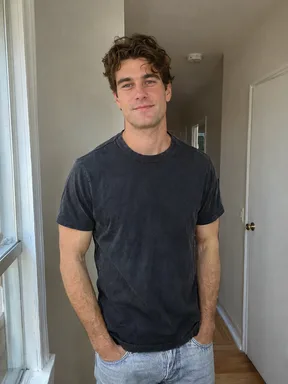 Source photo
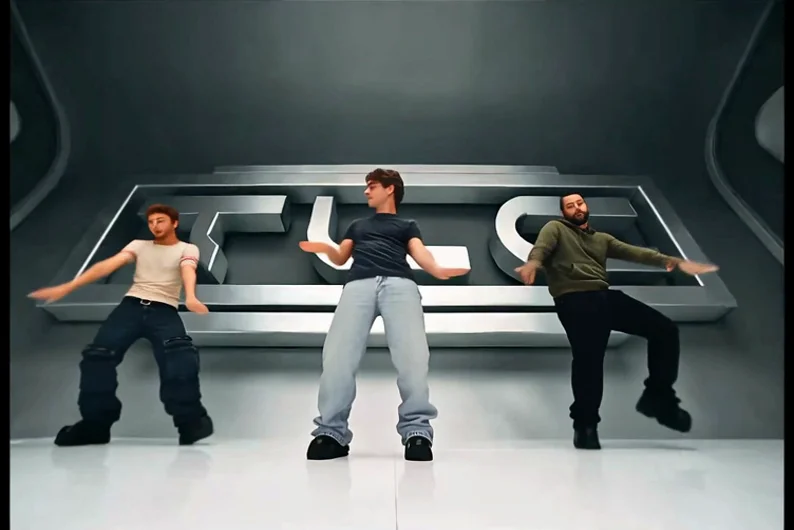 AI-generated result
Add a clear portrait to any dancer’s slot. To use one photo for all three positions, put a clear trio photo in the center slot.
Choose the 15-second elevator edit or the 23-second version with the studio opening. Add instructions if you want to preserve a detail from your photos.
Generate with your paid Vismuse credits. Play the result to check who appears in each position and how the audio lines up, then download it.
Put your portrait in the center slot to take the lead’s solo close-ups and the middle position in group shots.
Use two photos taken in different places. Pick the lead, then place the second portrait on the side you want to fill.
Give each person their own slot. Left and right refer to where the dancers appear on screen.
Put one photo of three clearly separated people in the Center lead slot. The person in the middle takes the lead, and both friends keep their sides.
The short cut starts at the elevator, then moves through solo close-ups, an overhead shot and the silver-stage trio.
Watch the 15-second exampleThe extended cut begins with the three dancers together in a bright studio before moving into the silver elevator sequence.
Go to video length settingsSee what makes the silver set, cuts and three-person formation recognizable.
See how to use one group photo or place individual portraits in each dancer’s slot.
Top up your Vismuse balance with a one-time credit pack.
300 Vismuse credits
$8.99 one-time
1,000 Vismuse credits
$19.99 one-time
3,000 Vismuse credits
$39.99 one-time
Pack names use Vismuse’s 10-second estimates. No Scrubs estimates are based on starting with the pack’s credits.
The demo is free to watch. Generating the 15- or 23-second edit uses paid Vismuse credits. Sign in to check whether your paid balance covers the selected edit.
See Pricing to compare one-time credit packs.
The same browser studio handles photo upload, clip length and the finished download.
The preset supplies the movement and shot timing. Use the optional instructions field for details you want the AI to keep, such as a jacket or hairstyle.
Sign in with Google or Apple using the same account where you keep your Vismuse credits.
It is a photo-to-video trend inspired by TLC’s No Scrubs music video. Your cast appears in a three-dancer routine with close-ups, coordinated choreography and a silver stage.
Yes. Put one portrait in the Center lead slot to appear in the middle, or use a side slot to replace that dancer. Empty slots keep the template dancers. To cast all three from one image, add a clear photo of three people to the Center lead slot and leave both side slots empty.
The 15-second edit starts at the silver elevator. The 23-second edit adds a bright studio opening before the elevator sequence.
Use well-lit JPG, PNG or WebP photos up to 10 MB each. Keep faces, hair and upper bodies visible. In a group shot, leave enough space to tell each person’s position apart.
You can generate using eligible paid Vismuse credits or purchase a one-time credit pack when available.
The demo is free to watch. Generating your own video requires paid Vismuse credits. Free trial credits don’t apply to this template.
Yes. Open the studio in your phone’s browser, add your photos and sign in with Google or Apple to generate. The preset supplies the choreography and soundtrack. You can leave the instructions field empty.
The studio generates a 480p landscape video in a 4:3 frame and provides an MP4 download. You can reframe the download in a video editor if you need a vertical 9:16 clip.
The studio keeps your draft in this browser while you sign in or buy credits. When you submit an eligible generation, your selected photos are uploaded to Vismuse to make the video.
The selected edit supplies its matching soundtrack. Play the demo to hear the audio, or review your finished clip on its task page.
Use photos you have permission to upload. If you plan to share the video publicly, check permission to use the photos and soundtrack for that purpose.
Open your video task, play the finished clip, and select Download MP4. You can reopen past tasks from Recents in your account menu.
Pick the people you want on the silver stage and start with their photos.